How to Create Relevant Prompts for Your Brand
Your entire SharePath Analytics experience depends on the prompts you track. Your dashboard scores, your competitor rankings, your visibility trends. All of it is only as useful as the prompts behind it.
Track the wrong prompts and you're looking at the wrong data. Track the right ones and you get a clear picture of where your brand stands in AI search and exactly where the gaps are.
This guide walks you through how to generate a strong set of 100 prompts you can upload directly into SharePath.
Why the Funnel Mix Matters
When people search Google, a lot of traffic comes from broad, top-of-funnel queries. Things like "what is property management software."
AI search is different. People use ChatGPT, Claude, and Gemini to make decisions, compare options, and get specific recommendations. Those are middle and bottom of funnel queries, and that's where the real visibility battles happen.
We recommend your prompt list follows this split:
- 70% Middle and Bottom of Funnel — comparisons, buying decisions, specific use cases (e.g., "best CRM for small sales teams," "HubSpot vs Salesforce for startups," "is Notion worth it for project management")
- 30% Top of Funnel — educational, awareness-level queries (e.g., "what is a CRM," "how does content marketing work")
Bottom and middle of funnel prompts are where AI is most likely to recommend specific brands. That's where you need to be visible.
Step 1: Use Our Prompt Generator Template
We've built a ready-to-use prompt that you can copy and paste into your preferred large language model (LLM) - ChatGPT, Claude or Gemini. It generates 100 prompts in a structured table, organized by funnel stage and tagged by topic.
Copy everything inside the box below and paste it into your LLM. Replace the bracketed sections with your own information.
I need you to generate 100 search prompts that real users would type into an AI assistant (like ChatGPT, Claude, or Perplexity) when researching, comparing, or buying products/services in my industry.
These prompts will be used to track my brand's visibility in LLM responses.
My Company
- Brand name: [Your brand name]
- Industry: [Your industry]
- Products/services: [List your main products or services]
- Target audience: [Who buys from you — role, company size, region]
- Key competitors: [List 3-6 direct competitors]
Prompt Requirements
Generate a table with 100 prompts across these categories:
Funnel distribution (important):
- 30% Top of Funnel: educational, awareness-level queries (e.g., "what is [industry concept]", "how does [process] work")
- 40% Middle of Funnel: comparison, evaluation queries (e.g., "[brand] vs [competitor]", "best [product type] for [use case]", "[product type] pros and cons")
- 30% Bottom of Funnel: purchase-intent, decision-stage queries (e.g., "is [brand] worth it", "[brand] pricing", "best [product type] for [specific need]")
Query types to include across all funnel stages:
- Direct brand queries (about my brand specifically)
- Competitor comparisons (my brand vs others, or competitors vs each other)
- Broader industry queries (category-level questions where I should show up)
- Commercially minded queries (pricing, ROI, buying decisions)
- Educational queries (how-to, explainers, best practices)
Output format: Return a table with 2 columns: Prompt | Relevant Tag
- Prompt: The exact query a user would type into an AI assistant
- Tag: Group related prompts under a descriptive tag (e.g., "Pricing", "Competitor Comparison", "Product Features", "Industry Education", "Use Case Fit"). Use no more than 10-12 unique tags across all 100 prompts.
Make the prompts sound natural. The way a real person would actually ask an AI, not how they'd type into Google. Use conversational phrasing.
BONUS: For Better Results Add Context Files
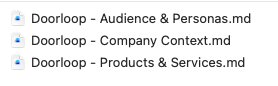
Before you hit enter, attach files that give the AI more context about your brand. The more it knows about you, the more relevant your prompts will be.
Good files to attach:
- Company overview or about page copy
- Product or service descriptions
- Audience or persona documents
- Competitor analysis or research
- Client call recordings or user research transcripts (if you have them)
Call recordings and user research are especially valuable. They contain the real language your customers use when talking about their problems, which leads to more natural, accurate prompts.
Step 3: Review Your Results
You'll get back a table of 100 prompts, each with a tag.

Don't upload all 100 without reviewing them first. The AI will get you about 90% of the way there, but you know your market better than it does.
Spend 10 minutes scanning the list:
- Remove any prompts that don't make sense for your business
- Tweak phrasing that feels off or too generic
- Add any prompts you know are important that the AI missed
Ten minutes of review here saves you from tracking irrelevant data for weeks.
What Your Final List Should Include
A strong prompt list has a good mix of:
Type
What it covers
Example
Direct brand queries
Questions about your brand specifically
"Is [your brand] good for enterprise teams?"
Competitor comparisons
Your brand vs. others, or competitors vs. each other
"[Your brand] vs [competitor] for [use case]"
Industry queries
Category-level questions where you should show up
"Best [product type] for [industry]"
Commercial queries
Pricing, ROI, buying decisions
"[Your brand] pricing" or "is [product type] worth the cost"
Educational queries
How-to questions, explainers, best practices
"How does [industry concept] work?"
Next Step
Once you've reviewed and finalized your prompt list, you're ready to upload them into SharePath.